
Wildcard characters in Excel can help you find specific content in your spreadsheet even when that content isn’t perfect. Whether you need to filter a list of items or reference the contents of cells in a formula, Excel usually needs perfectly matched data to work its magic. But this isn’t always possible; items may be […]
Excel Tutorials
Top Ways to Add a Zero in Front of a Number in Excel (+ video tutorial)
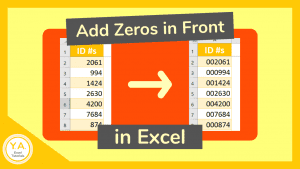
Sometimes referred to as “leading zeros,” it can be surprisingly tricky to add a zero in front of a number in Excel. Consider a set of numbers in Excel where you want them all to be the same number of characters but they’re not, so you need to add a zero in front of them. […]
How to Strikethrough in Excel – 3 Ways!

Strikethrough formatting adds a line through the middle of cell contents. You’ll want to Strikethrough in Excel to cross out text, numbers, or characters. This could be for things like to show that items in a to-do list have been completed or to symbolize that the cell contents are no longer relevant. 3 ways you […]
TEXT Function: Combine Text with Numbers in Excel (+ video tutorial)

If you’ve tried to combine text with numbers in Excel and keep the formatting, you’ve likely found that it is not always as straightforward as it may seem. For example, if you try to join text with numbers like dates, time, percentages, etc, you often end up with results that are hard to decipher. Your solution? Use […]
Insert Messages in Excel – 5 Ways!
Ever wonder if there’s more than one way to leave a message in Excel??? Whether to help you remember something or alert a coworker about something important, there are several ways you can insert messages in Excel…including a covert method! 5 Ways to Insert Messages in Excel 1. Insert a Comment (or “Note” for Office […]
Import Receipts to Excel (+ other documents too!) – with Video Tutorial
If you have the Excel mobile app on your phone or tablet, you can scan and import receipts to Excel by using the Data From Picture tool. You can also scan other printed documents to your spreadsheet, but, in this example, I’ll walk you through how to do this by scanning a receipt into the […]